Hi everyone, i want to post my Alternative Sync method for the useless Sync feature in IceDrive that has been causing so many issues not only for me, but it seems like many other users as well.
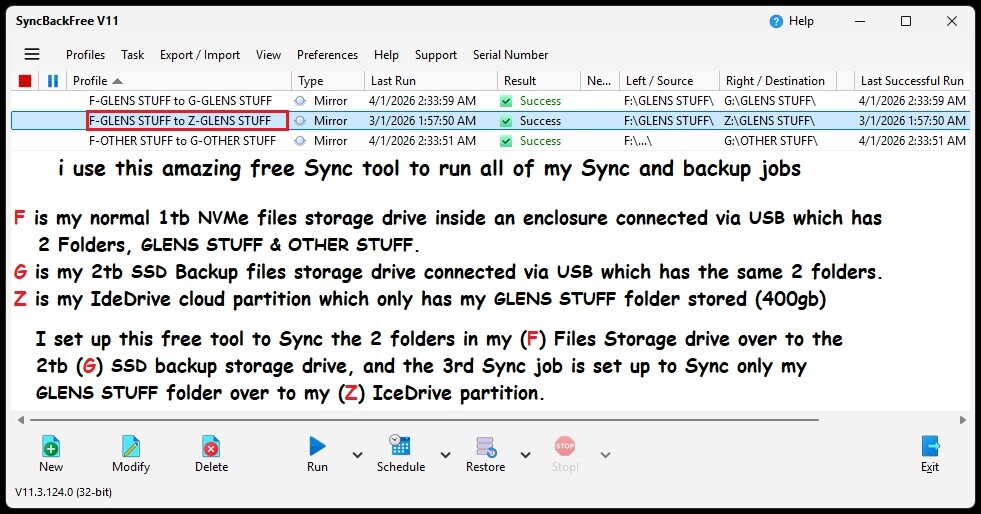
I use a Free Sync/Backup tool called SyncBackFree to run my daily manual or scheduled Sync jobs from my Main Files storage drive over to my IceDrive partition and to my 2tb files backup SSD.
This way i have never had any issues with any of my Sync jobs, as long as you set SyncBackFree up properly.
I have included 2 images to show you my own Sync Setup, and i hope others will find this helpful.
Cheers
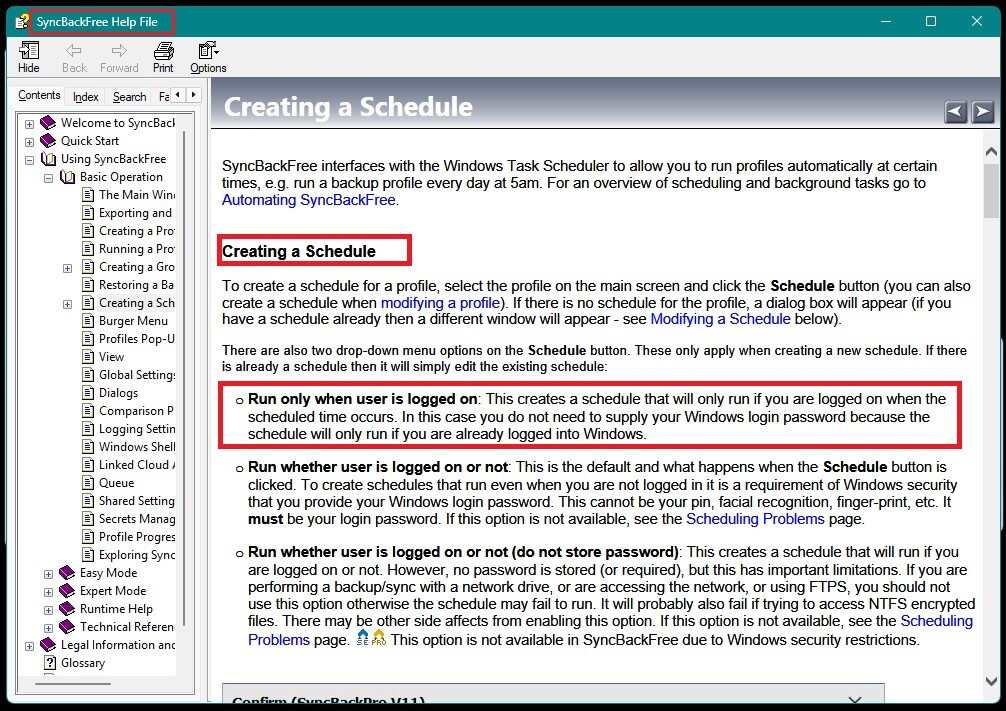
I run the Sync jobs schedule only when i am logged into my Windows system
1 Like
Hi Glen, SyncBackFree is OK, i use to use it many moons ago, but i think you need the paid version if you want it to track renames as the free version would just re-upload any renamed folders and delete the old name.
I prefer FreeFileSync that does track renames, and also offers a real time sync option, but it doesn’t have an in-built scheduler so you’d have to use the windows scheduler and freefilesync’s batch interface if you wanted scheduled syncs. just a thought.
1 Like
I don’t really care for tracking renamed folders or anything like that, i am completely happy for SyncBackFree to upload a renamed file or folder again and delete the original from the destination, and this is because i hardly ever change file names or folders, and if i did, then my NBN plan upload speed will have the files/folders uploaded to the cloud sooner than i can blink, so it’s not an issue for me, it might be for others, but it isn’t a deal breaker in the overall scheme of things.
It does have a scheduler tho.
I made a new folder today with 550 4k HEVC video files (300gb) and i manually copied that folder from my 1tb storage drive into my IceDrive partition folder which then uploaded it to my IceDrive folder.
I think i tried FreeFileSync some time ago along with a few others but i may not have liked the user interface as some of them are utter rubbish, so i will download it again and take another look.
Cheers
Thanks for posting this. I did wonder if SyncBack would do the job. I’m using FreeFileSync for now, though, as I’m already set up for it. But thanks for the confirmation!
Do you have any sync pairs set up? I’m wondering if you’re using “alternative backup” as a way to shore up anything Icedrive misses?
Hi, i use to run a scheduled Sync job for my F/GLENS STUFF to Z/GLENS STUFF but i ended up deleting it and i now run that Sync job manually when i have changed or added anything new to that folder, i have the SyncBackFree app on my desktop and i open it and hit the Run button, it has never failed to do the job in 4 years that i have had IceDrive.
I think that it is very sad that after all this time IceDrive developers have still not been able to fix their own Syncing tool, and i don’t know whether some of the issues are actually caused by the actual user, it seems like it might be to me, but i know there is an issue and it is just not reliable as an only form of files backup.
That is why i have a fully encrypted 1tb NVMe drive (done using Veracrypt) in a small enclosure that i connect to my PC via high speed USB-C when using it, and i also manually run a sync job to that drive as well when files are changed or added.
My current Icedrive sub expires in June and i am thinking of going back to Sync.com who i was using before i changed to IceDrive, prior to Sync.com i was using Dropbox.
1 Like
I don’t think it’s a user issue. If you look over some of the threads here, there are a lot of issues being raised about syncing. About a year ago (maybe longer now), Icedrive rewrote their app, which used to work nicely. It used to periodically scan your sync pairs and patch up the differences. And there was a mirror option.
Now they’re trying to emulate Dropbox, I think - and not quite hitting the mark. I frequently have issues with the sync pairs as they stand. Every now and then I delete them all and re-create them.
But where did the mirror option go? Now it’s a confusing combination of “Full Sync” vs “Backup” and (elsewhere) “Delete locally or not” and “Delete on cloud or not”. There was a lull in team communication around that time, which some of us thought they were taking on feedback. But they released the VPN instead.
I’m a holdout because I’m a lifer. But if your subscription is ending - well, only you know where you want to spend your money!
1 Like